

Monday, April 5, 2010


Error Message: String or binary data would be truncated. - SQL SERVER
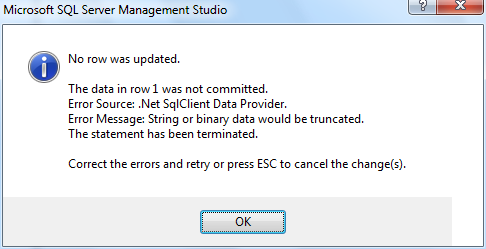
No row was updated.
The data in row 1 was not committed.
Error Source: .Net SqlClient Data Provider.
Error Message: String or binary data would be truncated.
The statement has been terminated.
Correct the errors and retry or press ESC to cancel the change(s).

The above error occurs in Microsoft SQL Server Management Studio when you attempt to enter more characters than the maximum level for that field
The data in row 1 was not committed.
Error Source: .Net SqlClient Data Provider.
Error Message: String or binary data would be truncated.
The statement has been terminated.
Correct the errors and retry or press ESC to cancel the change(s).
The above error occurs in Microsoft SQL Server Management Studio when you attempt to enter more characters than the maximum level for that field
How to set Case Sensitive comparison in SQL Server 2008
How to set a field as Case Sensitive in SQL Server 2008.
Here is a simple way to do that

No row was updated Error in SQL Server 2008
No row was updated.
The data in row 1 was not committed.
Error Source: .Net SqlClient Data Provider.
Error Message: Cannot insert the value NULL into column 'ID', table 'TeamDB1.dbo.PlayerDetails'; column does not allow nulls. INSERT fails.
The statement has been terminated.
Correct the errors and retry or press ESC to cancel the change(s).

This error occurs when you try leave a Primary Key Field empty
The data in row 1 was not committed.
Error Source: .Net SqlClient Data Provider.
Error Message: Cannot insert the value NULL into column 'ID', table 'TeamDB1.dbo.PlayerDetails'; column does not allow nulls. INSERT fails.
The statement has been terminated.
Correct the errors and retry or press ESC to cancel the change(s).

This error occurs when you try leave a Primary Key Field empty
Sunday, January 17, 2010
SQL SERVER – Differences in Vulnerability between Oracle and SQL Server
SQL SERVER – Differences in Vulnerability between Oracle and SQL Server
Here is a link to article by MVP Pinal Dave:
http://digg.com/software/Differences_in_Vulnerability_between_Oracle_SQL_SERVER
This article busts the myth that Oracle is better than SQL Server.
Link to original article: http://blog.sqlauthority.com/2009/12/18/sql-server-differences-in-vulnerability-between-oracle-and-sql-server/
Here is a link to article by MVP Pinal Dave:
http://digg.com/software/Differences_in_Vulnerability_between_Oracle_SQL_SERVER
This article busts the myth that Oracle is better than SQL Server.
Link to original article: http://blog.sqlauthority.com/2009/12/18/sql-server-differences-in-vulnerability-between-oracle-and-sql-server/
Monday, January 11, 2010
Assign Primary Key in SQL Server Management Studio
How to Create Primary Key in SQL Server Management Studio
- In Table Designer, click the row selector for the database column you want to define as the primary key. If you want to select multiple columns, hold down the CTRL key while you click the row selectors for the other columns.
- Right-click the row selector for the column and select Set Primary Key. A primary key index, named "PK_" followed by the table name, is automatically created; you can find it on the Indexes/Keys dialog box.
 Primary Key in SQL SERVER
 Primary Key Index
How to add Next and Previous Topic buttons to the SQL Server Help toolbar
- With SQL Server tutorials open, right-click an empty area of the toolbar, and then click Customize.
- In the Customize dialog box, click the Commands tab.
- In the Categories list box, click Help.
- From the Commands list box, drag the Next Topic button to the desired location on the toolbar.
- From the Commands list box, drag the Previous Topic button to the desired location on the toolbar.
- Click Close.
 SQL Server Help File
 Categories Box - Help
Subscribe to:
Posts (Atom)


