StumbleUpon
Share on Facebook

Tuesday, May 14, 2013

How to Perform Analysis with SQL Server Analysis Services Project (Step by Step Instruction)

How to Create Cubes, Dimensions and Measures in SQL Server Business Intelligence

What is the use of data if it is not for Analysis. What is the use of RDBMS if it is not providing the Analytics functionality. Here we take a look at the SQL Services Project of SQL Server 2008

There are multiple open source softwares like Pentaho / Jasper etc. that provide the functionality we will see below but nothing comes with the ease like SSAS

To start, open Business Intelligence Studio and create Analysis Services Project

 The wizard will create a project aling with required folders - Dimensions and Cubes the two most important of any Business Intelligence project

Creating Cube is easy in SQL Server. Right click on Cubes and select New Cube - a beautiful Wizard will guide

Select the Generate tables option

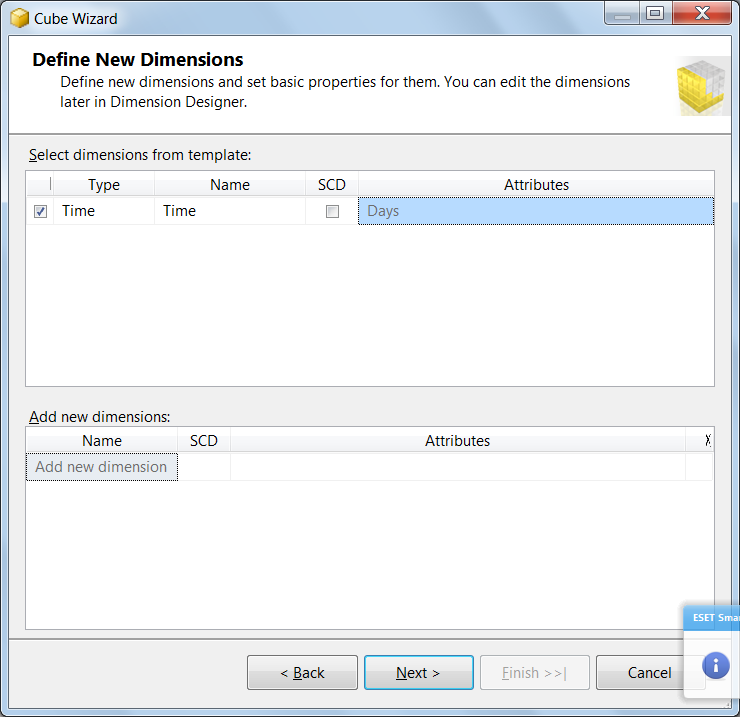
The below step helps you in Creating new Dimensions - OLAP is all about measures (Facts and Dimensions)

Facts and Dimensions in SQL Server

Time dimension is created and filled automatically by SQL Server based on settings


The above figure shows the measures and dimensions created by SQL SERVER.
 
 
Now we have the logical data model, we can create the Schema . SQL SERver Schema Creation Wizard helps to  create the required schema


StumbleUpon
Share on Facebook

Wednesday, May 8, 2013

How to import Large files (TXT / CSV) to SQL Server 2008 using SSIS


This can be done from the SQL Server by selecting the integration services project

The following


StumbleUpon
Share on Facebook

Monday, September 10, 2012

How to import CSV / Excel file to SQL Server Table

How to Load Excel File / CSV File to a SQL Server Table / Create SQL Server Table from Excel File

Step 1: Select Import and Export Wizard from Program


Step 2: Select Import and Export Wizard from Program

 Step 3: Select Flat File as Source


Step 4: Select the CSV / Text file

Step 5: Choose the Server


Step 6: Choose Database


Step 7: Specify Schema and Table Names
 Step 8: Run the Pachage

 
StumbleUpon
Share on Facebook

Specified column precision 50 is greater than the maximum precision of 38.

What is the Preferred Data Type for Price and Amount Fields

This error occurs when you are trying to define a Decimal field with precision more than 38. If you would require more precission, please use any of the following:

[Sales Price] [Numeric](50,2) NULL,

[Quantity] [int](50) NULL,

[Amount] [Numeric](50,2) NULL,

Money
Float


CREATE TABLE [dbo].[Transact.Details](
[Store ID] [varchar](50) NULL,
[Customer ID] [varchar](50) NULL,
[Transaction ID] [varchar](50) NULL,
[Transaction Date] [varchar](50) NULL,
[Category ID] [varchar](50) NULL,
[Item ID] [varchar](50) NULL,
[Sales Price] [Numeric](38,2) NULL,
[Quantity] [int] NULL,
[Amount] [Numeric](38,2) NULL,
) ON [PRIMARY]
StumbleUpon
Share on Facebook

Sunday, July 8, 2012

SQL Server blocked access to procedure 'sys.xp_cmdshell' of component 'xp_cmdshell' because this component is turned off as part of the security configuration for this server. A system administrator can enable the use of 'xp_cmdshell' by using sp_configure. For more information about enabling 'xp_cmdshell', see "Surface Area Configuration" in SQL Server Books Online.

The error occurs when I try to run the BCP utility

SQL Server blocked access to procedure 'sys.xp_cmdshell' of component 'xp_cmdshell' because this component is turned off as part of the security configuration for this server. A system administrator can enable the use of 'xp_cmdshell' by using sp_configure. For more information about enabling 'xp_cmdshell', see "Surface Area Configuration" in SQL Server Books Online.
StumbleUpon
Share on Facebook

How to Export Query as XML - SQL Server 2008

Save Recordset as XML using Select Query in SQL Server 2008


Let us consider the a table (shown below) with couple of columns that needs to be exported as XML

The following query

SELECT TOP 1000 [TrainID] as 'TrainNum'

,[TrainName]

FROM [OnlineTrans].[dbo].[TrainMaster] for XML PATH

Is used for generating a XML 
 On the other hand, If you want to have a meaningfully named element instead of , you need to specify the same in the query. The following query has the row element as well as the root element


SELECT TOP 1000 [TrainID] as 'TrainNum'

,[TrainName]

FROM [OnlineTrans].[dbo].[TrainMaster] for XML path ('TrainInfo'), root ('ParentInfo')

StumbleUpon
Share on Facebook

Sunday, May 6, 2012

'int' is not a recognized CURSOR option.


This error occurs when a variable name is preceded by # instead of @. # is used to declare temporary table

declare #myi int

Should be replaced by

declare @myi int

StumbleUpon
Share on Facebook

While Loop in SQL Server


While loop in T-SQL


Here is a simple example of While loop

Declare @temp tinyint = 1

while (@temp < 11)

begin

print cast(@temp as varchar(2)) + ' X 2 = ' + cast(@temp * 2 as char)

set @temp += 1

end

The above code will be having the following output:

Output

1 X 2 = 2

2 X 2 = 4

3 X 2 = 6

4 X 2 = 8

5 X 2 = 10

6 X 2 = 12

7 X 2 = 14

8 X 2 = 16

9 X 2 = 18

10 X 2 = 20


StumbleUpon
Share on Facebook

How to create a SQL Function that Returns a Table

SQL Create Table Valued Function (SQL SERVER 2008) / How to Create SQL_TABLE_VALUED_FUNCTION

The following snippet uses a Table variable to create a table and inserts value into it, which the function returns

CREATE FUNCTION ReturnATable()
RETURNS @TabVar TABLE
(
 OrderID int not null,
 OrderDate datetime,
 OrderStatus bit,
 OrderValue decimal,
 BilledBy varchar(20)
)
AS
BEGIN
DEclare @Date datetime ;
Set @Date= GETDATE();
Insert Into @TabVar values
(21, @Date , 1, 212.42, 'Jose');
return 
END

The function can be executed as shown below

Select * from ReturnATable()
StumbleUpon
Share on Facebook

Monday, September 5, 2011

How to get Column Names of All Tables in a database through SQL Query / SysTables in SQL Server 2008

How to list all tables and each table, loop through each column using SQL query

It is not uncommon to get the list of all column names from all available tables; at times some valuable information peeps out when one researches it. The following query will get you exactly that


select sys.syscolumns.name as ColumnName, sys.sysobjects.name as TableName from sys.syscolumns,sys.sysobjects where sys.sysobjects.id = sys.syscolumns.id


StumbleUpon
Share on Facebook

Friday, June 3, 2011

How to Split SQL String to Multiple String using Delimiter

How to check if a text exists within another in SQL Server 2008 / How to split SQL Column based on Comma

You can use the combination of CharIndex and Substring function in SQL to split the string based on delimiter.

Here is a way to split a column based on Comma

Select LTRIM(SUBSTRING(EmpAddress, CHARINDEX( ',',EmpAddress)+1,len(EmpAddress))) from #TempEmployee


We have used Ltrim to remove any leading spaces
StumbleUpon
Share on Facebook

Tuesday, May 31, 2011

A RETURN statement with a return value cannot be used in this context. - Create Function

If this error occurs in the Create Function that uses a table then the variable after return statement should be removed

The syntax should be like

Create Function
Returns Table
(
Table Definition here
..
..
)
as
BEGIN
..
..
RETURN -- note no value is returned here
END
StumbleUpon
Share on Facebook

How to get the list of Functions in Database

How to Filter Functions from Sys.Objects

The following query will list of the Functions that are part of the database:

SELECT * FROM

sys.objects

where type in ('FN', 'IF', 'TF')
StumbleUpon
Share on Facebook

Monday, February 21, 2011

Cannot alter column 'X' because it is 'timestamp'.

How to Change DataType of TimeStamp Column.

Datatype of Timestamp column cannot be deleted. Hence it is advised to drop the column and re-create it

For example,

ALTER TABLE [dbo].[PerformanceMaster] DROP COLUMN PerformanceDate
ALTER TABLE [dbo].[PerformanceMaster] ADD PerformanceDate datetime2
StumbleUpon
Share on Facebook

Cannot insert an explicit value into a timestamp column. Use INSERT with a column list to exclude the timestamp column, or insert a DEFAULT into the timestamp column.

TimeStamp Column in SQL Server

TimeStamp is used to store unique binary numbers within a database. This column is autogenerated with a storage size of 8 bytes.

SQL Server - TimeStamp Column


IF you want to store the Date and Time (e.g., updated time etc) use datetime2 datatype instead of timestamp.

SQL Server DateTime Column to Record Date and Time


The error "Cannot insert an explicit value into a timestamp column. Use INSERT with a column list to exclude the timestamp column, or insert a DEFAULT into the timestamp column." occurs when you try to insert the value using Insert statement. Leaving the column in the Insert will automatically update the value

Insert into PerformanceMaster (PerformanceID, EventID, ArtistID, PerformanceDate     )
values (@PerformanceID, @EventID, @ArtistID, @UpdateDate )


Should throw and error. Use the following instead:


Insert into PerformanceMaster (PerformanceID, EventID, ArtistID, )
values (@PerformanceID, @EventID, @ArtistID)
StumbleUpon
Share on Facebook

Friday, January 14, 2011

Information_Schema.Routines doesn't return all procedure names

How to get a list of Procedures containing Specific Text / How to get a list of Procedures using Particular Table


Here is one method we generally use for returning Stored Procedures containing a particular text

SELECT ROUTINE_NAME


FROM INFORMATION_SCHEMA.ROUTINES


WHERE ROUTINE_DEFINITION LIKE '%used_by_id%'
AND ROUTINE_TYPE = 'PROCEDURE'


order by ROUTINE_NAME

 
However, we found it has some problems when the text appears at the fag end of big procedures. Instead try the following also and match the result
 
SELECT OBJECT_NAME(id)


FROM syscomments


WHERE [text] LIKE '%used_by_id%'


AND OBJECTPROPERTY(id, 'IsProcedure') = 1


GROUP BY OBJECT_NAME(id)


SELECT Name


FROM sys.procedures


WHERE OBJECT_DEFINITION(object_id) LIKE '%used_by_id%'


order by name


SELECT OBJECT_NAME(object_id)


FROM sys.sql_modules


WHERE Definition LIKE '%used_by_id%'


AND OBJECTPROPERTY(object_id, 'IsProcedure') = 1


order by OBJECT_NAME(object_id)
StumbleUpon
Share on Facebook

Thursday, December 16, 2010

How to Specify Foriegn Key Relationships in SQL Server 2008

Foriegn Key in SQL Server 2008 - Use the Relationships option


Specify the relationship between the columns


StumbleUpon
Share on Facebook

Unable to change Identity Specification in SQL Server 2008

Unable to change Identity Specification in SQL Server 2008

StumbleUpon
Share on Facebook

How to make Server Explorer visible in Visual Studio

Server Explorer not visible in Visual Studio

StumbleUpon
Share on Facebook

Your pending changes require the following tables to be dropped and re-created


Remove the checkbox 'Prevent saving changes'
Related Posts Plugin for WordPress, Blogger...